api management
240 TopicsRotating credentials in Azure API Management
Credentials covered by this guidance Subscription keys Named values that contain secrets Backend credentials (headers, query parameters, client certificates) OAuth 2.0 and OpenID Connect client secrets Connection strings (for example, Event Hubs loggers) Credentials written directly into policies How to rotate safely Use this order when both credentials can remain valid: Create a new secret where it is issued. Update API Management with the new secret. Test your APIs. Revoke the old secret. Important: Rotate each credential where it is issued (for example, the backend service or identity provider), not only in API Management. Updating the value in API Management alone does not invalidate the old credential. Find your instances and credentials Step 1: List your API Management instances In the Azure portal, search for API Management services, or use Azure CLI: In one subscription: az apim list --subscription {subscriptionId} --query "[].{name:name, resourceGroup:resourceGroup}" --output table Across accessible subscriptions (one Azure Resource Graph page): az graph query -q "resources | where type =~ 'microsoft.apimanagement/service' | project name, resourceGroup, subscriptionId, location" Step 2: List the credentials in each instance In the commands, replace {base} with https://management.azure.com/subscriptions/{subscriptionId}/resourceGroups/{rg}/providers/Microsoft.ApiManagement/service/{apimName} , and the other values in braces with your own. In policies, look for values such as Authorization headers, keys, passwords, tokens or connection strings written out in full instead of referenced as a named value. Subscription keys are under APIs > Subscriptions in the Azure portal. az rest --method get --url "{base}/subscriptions?api-version=2024-05-01" Named values are under APIs > Named values. The Type column shows whether each secret is stored in API Management or in Key Vault. az apim nv list --resource-group {rg} --service-name {apimName} --output table Backend credentials are under APIs > Backends > Authorization credentials. az rest --method get --url "{base}/backends?api-version=2024-05-01" OAuth 2.0 and OpenID Connect providers are under Developer portal > OAuth 2.0 + OpenID Connect. Developer portal sign-in providers are under Developer portal > Identities. az rest --method get --url "{base}/authorizationServers?api-version=2024-05-01" az rest --method get --url "{base}/openidConnectProviders?api-version=2024-05-01" az rest --method get --url "{base}/identityProviders?api-version=2024-05-01" List providers under APIs > Credential manager: az rest --method get --url "{base}/authorizationProviders?api-version=2024-05-01" Loggers that use connection strings (Event Hubs, Application Insights): az rest --method get --url "{base}/loggers?api-version=2024-05-01" Check global, API, and operation policies under Design. For product policies, select Products > the product > Policies. az rest --method get --url "{base}/policies/policy?format=rawxml&api-version=2024-05-01" az rest --method get --url "{base}/apis/{apiId}/policies/policy?format=rawxml&api-version=2024-05-01" Step 3: Read the current secret values Read each secret to identify which systems use it before you rotate it. This requires permission to read secrets on the instance. Store the output securely and delete it when you are finished. az rest --method post --url "{base}/subscriptions/{sid}/listSecrets?api-version=2024-05-01" az apim nv show-secret --resource-group {rg} --service-name {apimName} --named-value-id {namedValueId} az rest --method post --url "{base}/authorizationServers/{id}/listSecrets?api-version=2024-05-01" az rest --method post --url "{base}/openidConnectProviders/{id}/listSecrets?api-version=2024-05-01" az rest --method post --url "{base}/identityProviders/{id}/listSecrets?api-version=2024-05-01" az rest --method post --url "{base}/tenant/access/listSecrets?api-version=2024-05-01" Rotate each credential type The commands below use the same {base} placeholder as in Step 2. Replace the other values in braces with your own. Subscription keys Move callers to the secondary key, regenerate the primary key, move callers to the new primary key, then regenerate the secondary key. az rest --method post --url "{base}/subscriptions/{sid}/regeneratePrimaryKey?api-version=2024-05-01" az rest --method post --url "{base}/subscriptions/{sid}/regenerateSecondaryKey?api-version=2024-05-01" For additional details, see Subscriptions in Azure API Management. Named values If the named value is backed by Key Vault, store the replacement in Key Vault, point any pinned reference to the new version, and refresh the named value. If the secret is stored in API Management, update the value with a new credential and consider moving it to Key Vault. az rest --method post --url "{base}/namedValues/{namedValueId}/refreshSecret?api-version=2024-05-01" az apim nv update --resource-group {rg} --service-name {apimName} --named-value-id {namedValueId} --value "{newValue}" For additional details, see Use named values in Azure API Management policies. Backend credentials Stage the replacement at the backend. Update and test API Management before revoking the old credential. Example for a backend with only one credential, using its current ETag: az rest --method patch --url "{base}/backends/{backendId}?api-version=2024-05-01" --headers 'If-Match={etag}' --body '{"properties":{"credentials":{"header":{"{headerName}":["{newKey}"]}}}}' For additional details, see Backends in API Management. OAuth 2.0 and OpenID Connect client secrets Create the secret at its issuer. Update API Management, republish the portal if used, and test before deleting the old secret. For Microsoft Entra ID: az ad app credential reset --id {appId} --append --display-name "apim-rotation" az ad app credential delete --id {appId} --key-id {oldKeyId} For additional details, see Add and manage application credentials in Microsoft Entra ID. Connection strings For Event Hubs, switch the logger to the secondary connection string and test delivery before renewing the namespace rule’s primary key: az eventhubs namespace authorization-rule keys renew --resource-group {rg} --namespace-name {namespace} --name {ruleName} --key PrimaryKey For additional details, see How to log events to Azure Event Hubs in Azure API Management. Credentials in policies Create the replacement at the source. Reference its Key Vault-backed named value as {{display-name}} . Test the policy before revoking the old credential. For additional details, see Use named values in Azure API Management policies. Management API access keys For legacy Direct Management API keys, switch callers off each key before regenerating it. az rest --method post --url "{base}/tenant/access/regeneratePrimaryKey?api-version=2024-05-01" az rest --method post --url "{base}/tenant/access/regenerateSecondaryKey?api-version=2024-05-01" For additional details, see Tenant Access - Regenerate Primary Key. Best practices going forward Use managed identities instead of keys and connection strings wherever supported. Store secrets in Azure Key Vault and reference them as named values. Use a secret identifier without a version for automatic refresh. Rotate credentials regularly and automate rotation where possible. Review your configuration for subscriptions, users, policies or backends that you did not create. Additional documentation Subscription - Regenerate Primary Key (REST API): https://learn.microsoft.com/rest/api/apimanagement/subscription/regenerate-primary-key Subscription - Regenerate Secondary Key (REST API): https://learn.microsoft.com/rest/api/apimanagement/subscription/regenerate-secondary-key Named Value - Refresh Secret (REST API): https://learn.microsoft.com/rest/api/apimanagement/named-value/refresh-secret Configure OAuth 2.0 in the developer portal test console: https://learn.microsoft.com/azure/api-management/api-management-howto-oauth2 About API credentials and credential manager: https://learn.microsoft.com/azure/api-management/credentials-overview1.3KViews0likes0Comments
Azure API Management Premium v2 now supports private CNAME records
We’re excited to announce support for private CNAME records in Azure API Management Premium v2, providing greater flexibility for customers deploying API gateways in private network environments. Organizations increasingly rely on private networking to securely expose APIs to internal applications, enterprise workloads, and services connected through virtual networks. With this enhancement, customers can now use private DNS CNAME records to resolve custom gateway hostnames to their Azure API Management Premium v2 instances, simplifying DNS management and enabling more flexible private networking architectures. What's new? Azure API Management Premium v2 now supports private CNAME resolution for gateway endpoints accessed through private networking. Previously, customers configuring private DNS for Premium v2 deployments could encounter limitations when using CNAME records, requiring alternative DNS configurations to resolve gateway endpoints. With this enhancement, customers can configure private CNAME records that point to their API Management gateway hostnames, allowing internal applications to access APIs using familiar, organization-defined DNS names. Key benefits Simplified private DNS management Customers can use CNAME records within their private DNS infrastructure instead of managing direct IP address mappings for every internal gateway alias. This reduces DNS maintenance overhead and simplifies endpoint configuration. Greater flexibility for enterprise networking Organizations can align API Management gateway DNS configurations with existing enterprise DNS naming conventions, making it easier to integrate Premium v2 into established private networking environments. Improved operational efficiency Using DNS aliases helps decouple internal application configurations from underlying gateway DNS records, reducing the need for application-level changes when DNS mappings are updated. Support for private API architectures The enhancement makes it easier to deploy Premium v2 as a centralized API gateway for internal applications and services, including workloads connected through Azure virtual networks and hybrid enterprise networks with appropriate DNS resolution and network connectivity. Example scenario Consider an organization deploying Azure API Management Premium v2 to expose APIs privately to applications running within its enterprise network. The organization wants internal applications to access APIs through a consistent hostname, such as: api.contoso.com With private CNAME support, the organization can configure a DNS alias in its private DNS infrastructure: api.contoso.com. CNAME myapim.azure-api.net. Internal applications can then resolve the custom hostname through the organization's private DNS infrastructure, while the underlying gateway hostname resolves to the appropriate private endpoint address. The custom hostname must also be configured on the API Management gateway with an appropriate TLS certificate. DNS aliasing alone does not configure the gateway to accept the custom hostname. Getting started To use private CNAME records with Azure API Management Premium v2: Deploy or use an existing Azure API Management Premium v2 instance with the appropriate private networking configuration. Configure private DNS resolution for the API Management gateway endpoint. Create a private CNAME record that points your preferred internal hostname to the gateway hostname. Configure the corresponding custom gateway hostname and TLS certificate in API Management. Verify that internal clients can resolve the hostname to the expected private IP address and establish secure HTTPS connections. For more information, see the Azure API Management documentation: Azure API Management networking options Configure a custom domain name for Azure API Management Availability Private CNAME support is now available for Azure API Management Premium v2, enabling customers to simplify private DNS configurations and integrate API gateways more seamlessly into enterprise networking environments. This enhancement is part of our continued investment in Azure API Management Premium v2, helping organizations build secure, scalable, and enterprise-ready API architectures.Azure AI Gateway is now generally available: Ship faster, stay in control
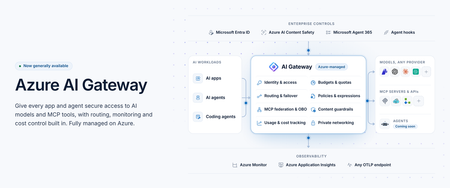
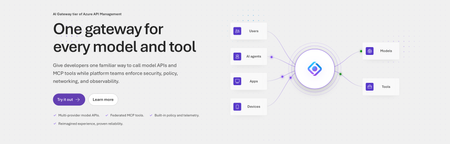
Today at Microsoft Ignite 2026, we're announcing the general availability of Azure AI Gateway, a fully managed Azure service that lets you set up a single, controlled path from your AI applications and agents to models and tools across providers. Developers build with the models and tools they choose, and platform teams manage access, enforce policies, control costs, and monitor usage from one place, without operating gateway infrastructure. Azure AI Gateway, previously in public preview as the AI Gateway tier of Azure API Management, is now a standalone product optimized for governing access to AI models and tools, with a roadmap focused entirely on AI. You can use it by itself with any app or agent, or together with Microsoft Foundry, where you build and run agents, and Microsoft Agent 365, where you manage them. Azure AI Gateway is available today in 17 Azure regions. To make it easy to get started, it offers a freemium, per-use pricing model with 10,000 free requests per gateway each month. Paid billing begins January 1, 2027. See the Regions and pricing section below for details. Why enterprise AI needs a unified governance layer Enterprise AI has moved beyond one app calling one model. Organizations use models from several providers, build agents that act through enterprise tools, and scale AI across teams. When each app manages its own credentials, routing, safety, and usage limits, governance becomes fragmented. Developers struggle to find approved models and tools, and platform teams can't see who is using what, what it costs, or which policies apply. Azure AI Gateway lets you move those controls out of individual apps and into one place, where they apply consistently to every app and agent you connect. How Azure AI Gateway works Apps and agents you connect call the gateway instead of calling each model or tool directly. On every request, the gateway authenticates the caller with Microsoft Entra ID or a gateway access key, enforces access rules and your policies, routes the request to the right model or tool, and records telemetry. Figure 1. Azure AI Gateway sits between callers and backends, governing every request that passes through it. What you can do with Azure AI Gateway Build with models and tools across providers Any model, one name: Use models from Microsoft Foundry, Azure OpenAI, OpenAI, Anthropic, Amazon Bedrock, Google Vertex AI, or any OpenAI-compatible endpoint. Apps call each model by an alias you define, so you can switch models without changing app code. Routing and failover: Route by priority, weight, or custom conditions, with configurable failover, or let Model Router (preview) choose by cost or quality. Consolidated tools: Federate MCP servers and turn OpenAPI specs, connectors, and API Management APIs into MCP tools. Multiple MCP spec versions are supported, including the latest (July 2026). The APIs you know: Call models through an OpenAI-compatible API or the Anthropic Messages API and connect agents to tools from any MCP client. Govern and observe AI interactions Access with Entra ID: Built-in roles control who can use models and tools. Provider keys and tool credentials never reach app code. Safety on every prompt: Screen prompts and responses with Azure AI Content Safety. Only approved tools: Curate and block tools at the gateway, or through Microsoft Agent 365 policies. Protection from poisoned tools (preview): Through the Microsoft Agent 365 integration, Microsoft Defender and Microsoft Purview inspect tool calls and results and block threats before an agent acts. Delegated identity: With on-behalf-of (OBO) authentication, tools act with the signed-in user’s own permissions. Every call on record: Record the caller, target, tokens, and outcome of each model and tool call, trace each call to its agent, and export the data over OpenTelemetry to Application Insights, Datadog, Splunk, Grafana Cloud, or any OTLP endpoint. Private by design: Private Link (preview) for inbound calls, VNet integration (preview) for private backends, IP filtering, and managed identity. Control AI spend as adoption scales See who spends what: Track tokens and estimated cost by user, team, app, agent, provider. Enforced budgets: Cost limits stop new requests once estimated spend reaches a budget. Fair sharing: Token and request limits keep one caller from crowding out the rest. Discover, build, and operate in your existing workflow Coding agent plugin: Developers find approved models and tools and connect their apps from their coding agent. Portal, CLI, Bicep, and REST API: Configure in the portal or with the CLI, then deploy the same setup as code from your CI/CD pipelines with Bicep or the REST API. See Azure AI Gateway in action From connecting models and MCP tools to securing access, controlling costs, and monitoring AI traffic, this demo shows how Azure AI Gateway helps you run AI applications with confidence. Extend AI governance across your Microsoft ecosystem Already using Microsoft Foundry, Microsoft Agent 365, or Azure API Management? Azure AI Gateway works with all three. Microsoft Foundry: Foundry has governance built in for its resources and projects. When AI spreads across teams, Foundry resources, subscriptions, and other providers, the gateway adds a shared layer on top. In a hub-and-spoke model, the gateway is the hub: a central platform team sets the rules once, and developers keep building in their Foundry projects, the spokes, using approved models and tools without managing credentials. Projects can share one deployment, including PTU, and fail over to another Foundry resource or provider. Foundry prompt agents can use gateway models through a model connection (preview), without code changes. Microsoft Agent 365: Agent 365 discovers the gateway’s MCP servers and lets you set tool policies. The gateway enforces those policies, alongside its own, on every tool call, with added threat protection (preview) from Defender and Purview. Regions and pricing Azure AI Gateway is available today in 17 Azure regions: East US, East US 2, East US 2 EUAP, West US, West US 2, Central US, North Central US, South Central US, Canada East, West Europe, North Europe, UK South, France Central, Sweden Central, Australia East, Japan East, and Southeast Asia. Azure AI Gateway offers a freemium, per-use pricing model with 10,000 free requests per gateway each month. Paid billing begins January 1, 2027. Monthly gateway requests Service fee Additional request charges Up to 10,000 Free None More than 10,000, up to 10 million $500 per month, per gateway, billed hourly None (includes 10 million requests) More than 10 million $500 per month, per gateway, billed hourly $20 per additional million requests, billed in increments of 10,000 requests Prices are in US dollars and may vary by region. Exact regional prices will be available when billing begins. Get started with Azure AI Gateway Create a gateway at ai.gateway.azure.com. It’s ready in about a minute and free to start. Then: Connect an existing model and give it an alias. Expose the MCP tools your agents need. Give your team access with an AI Gateway role. Set a cost limit. Point your app or agent at the gateway. Or start from your coding agent. Install the Azure AI Gateway plugin, and it finds approved models and tools and connects your app for you. Explore the documentation and quickstarts at ai.gateway.azure.com/docs.6.5KViews1like1CommentAI Gateway tier of API Management now in public preview
Today, we are introducing the AI Gateway tier of Azure API Management, now in public preview. It gives platform teams a purpose-built experience built specifically for AI workloads - publishing and governing models and MCP servers. Controls are configured through policy cards rather than XML and expressions, and the portal experience and control plane are structured around models, MCP servers, and tools rather than APIs. (For brevity, we refer to the AI Gateway tier as AI Gateway throughout the rest of this article.) AI Gateway is built on Azure API Management, bringing proven operational capabilities to AI workloads. The resource runs in your subscription, uses your Entra tenant, and sends telemetry to destinations you control. The operating model will be familiar to existing API Management customers, but the interface is built around AI workloads. The AI Gateway tier is intended for teams that want this focused experience; other API Management tiers remain the right choice when organizations also need general-purpose API management or capabilities not included in the AI Gateway experience. A practical model for platform teams The AI Gateway gives platform teams a shared place to manage models, MCP servers, policies, and observability destinations, with access controlled through Azure RBAC. For example, a central platform group can connect a set of approved models and tools and publish them for application teams. The application teams can test those assets in the test console and build against them without routing every change through the central group. The platform group still owns the shared guardrails and can see how the assets are being used. After an asset is published, developers can create a named runtime key and begin calling the gateway immediately. Bring the models and tools you already use Most organizations don't standardize on a single model provider. Different models are selected based on quality, latency, cost, geography, or specialized capabilities. The preview supports models from Microsoft Foundry including OpenAI, Anthropic, Mistral, and other Foundry hosted models, as well as models hosted in AWS Bedrock, Google Vertex AI, OpenAI, and Anthropic. A guided wizard simplifies importing models from Microsoft Foundry. Other providers can be added by configuring a connection, with backend authentication configured as part of that connection. All published models are available under the same stable endpoint. Applications continue to use supported API formats such as OpenAI Chat Completions and Responses or Anthropic Messages directly or via SDKs. The AI Gateway extends governance beyond models to the MCP servers and tools agents use to interact with enterprise systems. You can expose an existing MCP server over SSE or Streamable HTTP, turn all or selected operations from a REST API into an MCP server by uploading its OpenAPI specification, or use more than 1,400 connector-backed tools from the Power Platform and Logic Apps library. You can also federate multiple MCP servers behind a single server, so an agent connects once and sees the tools across those servers. Backend authentication supports an API key, OAuth client credentials, managed identity, or mTLS. Governance that's built in Organizations need consistent governance across models and MCP servers without requiring every application team to implement those capabilities independently. The AI Gateway portal presents governance policies through an intuitive card-based experience rather than requiring policy XML. The same policies are expressed as JSON properties, making them easy to manage as infrastructure as code and to audit and enforce across a fleet with Azure Policy. In the public preview, those cards cover request and token rate limits, token quotas, Azure AI Content Safety, and fallback to a secondary model. Policies are applied per asset, making it clear which controls protect each model or MCP server. OpenTelemetry-based token metrics The AI Gateway emits token-usage metrics through OpenTelemetry, with attributes following GenAI and cloud semantic conventions. Metrics can be sent to Application Insights, Datadog, Splunk, Grafana Cloud, or another OTLP endpoint. The portal provides a monitoring view over Application Insights data. Better together: Microsoft Foundry and AI Gateway With AI Gateway, teams can extend the same governance controls, for example token rate limits and quotas, across models hosted in Microsoft Foundry and models hosted elsewhere. Foundry and non-Foundry models are published through gateway-managed endpoints, giving applications and agents a consistent way to access governed models regardless of where they are hosted. Foundry-hosted agents can consume curated sets of tools from Foundry toolboxes, with access to the underlying MCP servers and APIs governed through AI Gateway. Together, Microsoft Foundry and AI Gateway cover the enterprise application lifecycle: Foundry for building and running AI applications, and AI Gateway for publishing, governing, and observing models, tools, and MCP servers across your AI estate. The new AI Gateway tier will soon be available through the gateway experience in Microsoft Foundry portal. We are working toward a seamless, integrated AI Gateway experience within Foundry portal and will share more about that work separately. Available today in public preview The AI Gateway tier is available today at no cost in public preview in East US 2 and Sweden Central. Pricing will be shared separately. To provision a resource, add a model or MCP server, and make a first call click this to go to the AI Gateway tier portal and try it. If you prefer to start from code, use a sample to deploy all the required resources for a Foundry-hosted agent configured to access its model and tools through AI Gateway. We look forward to your feedback as we continue to rapidly evolve AI Gateway.9.6KViews5likes11CommentsWhat's new in Azure API Management at Microsoft Ignite 2026
As organizations scale AI adoption, applications increasingly rely on models across providers, while agents access enterprise APIs and tools. Developers need the flexibility to build with these resources, but securing access, enforcing policies, and managing consumption across them introduces new complexity. At Microsoft Ignite 2026, we're announcing the general availability of Azure AI Gateway and new capabilities in Azure API Management to help organizations accelerate development, extend enterprise governance to AI interactions, and scale with confidence. Azure AI Gateway is now generally available Get AI applications and agents to production faster with Azure AI Gateway. This fully managed Azure service gives developers the flexibility to build with models and MCP tools across providers, while platform teams centrally govern access, policies, and AI spend without managing gateway infrastructure. Previously available in public preview as the AI Gateway tier of Azure API Management, it's now a standalone Azure service. With Azure AI Gateway, organizations can: Accelerate AI development: Connect to models and MCP tools across providers using stable aliases, flexible routing, and automatic failover. Model Router (preview) can also select models based on cost or quality objectives. Govern and observe AI interactions: Centralize identity, access policies, content safety, and observability across model and tool calls. Control AI spend: Track and attribute token usage and estimated costs across users, teams, applications, and agents, and enforce cost limits, quotas, and rate limits. Read more about the GA announcement here. Get started with Azure AI Gateway with 10,000 free gateway requests per Azure subscription each month. Extend governance to AI agents and tools As agents increasingly access enterprise systems through MCP tools, organizations need to control which tools they can use and enforce policies when agents act. The Microsoft Agent 365 integration with Azure API Management and Azure AI Gateway is now generally available, connecting centralized agent governance with runtime enforcement. Organizations can discover supported gateways and MCP servers, manage access policies, enforce supported tool restrictions, and monitor interactions for security and auditing. This gives security and platform teams consistent control over agent access to enterprise tools, while allowing developers to focus on building agents. Simplify development and API consumptio We're also advancing Azure API Management to make APIs and AI models easier to consume while maintaining enterprise security and control. Simplify multi-model development: The Unified Model API, now generally available in Azure API Management v2 SKUs, lets developers use a consistent API format across supported providers, including OpenAI and Anthropic. Azure API Management handles provider-specific transformations, making it easier to switch or fail over between models without changing client code. Learn more about the Unified Model API. Simplify application onboarding: The Applications feature, now available in public preview to all customers on supported Azure API Management tiers, lets API providers register consuming applications, associate them with API products, and manage identity-based access through Microsoft Entra ID. This simplifies onboarding and API authorization. To get started, see the Applications documentation. Scale enterprise APIs across more regions Azure API Management Premium v2 is now available in 35 Azure regions, giving organizations greater flexibility to deploy enterprise APIs closer to applications and users while meeting regional deployment requirements. Customers can provision Premium v2 instances through the Azure portal, REST APIs, Bicep, or Azure Resource Manager templates. See the full list of supported regions. Building the future of enterprise API and AI governance With the innovations announced at Microsoft Ignite 2026, we're helping organizations build AI applications faster, extend governance across APIs and AI interactions, and scale enterprise workloads with the security, visibility, and control their businesses require. Join us at Microsoft Ignite 2026 If you're attending Microsoft Ignite in San Francisco, join our sessions to explore the latest innovations, see demos, and connect with our product experts. BRK425: Secure and manage AI workloads at enterprise scale with AI Gateway THR902: Take control of runaway AI costs with AI Gateway TT1697: How are you governing AI and agent access with AI Gateway? LTG1285: Operationalize MCP with enterprise governance controls Stop by the Serverless Apps and Agents booth to meet our product team, see the latest capabilities, and share what you're building. We look forward to seeing you there!Azure API Management Applications feature now available in public preview to all customers
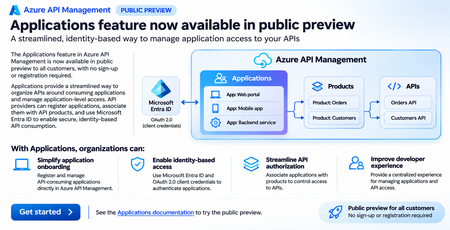
We are excited to announce that the Applications feature in Azure API Management is now available in public preview to all customers, with no sign-up or registration required. Applications introduce a streamlined, application-centric approach to managing API consumption, helping organizations simplify application onboarding, enable identity-based authentication, and manage access to APIs through Azure API Management. With this public preview, customers can explore and use the Applications feature in supported Azure API Management tiers without enrolling in a preview program or requesting access. Simplifying how applications consume APIs As organizations expand their API ecosystems, managing access for different applications, services, and development teams becomes increasingly important. Traditionally, API providers have relied on API subscriptions and subscription keys to manage access to APIs. While subscription keys provide a straightforward mechanism for identifying and controlling API consumption, enterprise applications increasingly use Microsoft Entra ID and OAuth 2.0 for secure, identity-based authentication. Organizations also need a consistent way to understand which applications consume their APIs, manage application access to API products, and simplify onboarding for application developers. The Applications feature in Azure API Management addresses these needs by introducing an application-level abstraction for API consumption. Rather than managing API access solely through subscriptions, API providers can register consuming applications, associate them with API products, and configure Microsoft Entra ID integration to support secure application authentication. This provides a more structured approach to managing API consumers while building on the existing API Management product model. What are Applications in Azure API Management? Applications represent software applications or services that consume APIs published through Azure API Management. An application can be associated with API products, which group APIs and provide a logical boundary for managing API access. With Applications, API providers can: Register API-consuming applications: Create and manage application records directly in Azure API Management, establishing a centralized inventory of applications consuming APIs. Associate applications with API products: Define which API products an application is authorized to consume, simplifying access management across related APIs. Integrate with Microsoft Entra ID: Use Microsoft Entra ID and OAuth 2.0 client credentials to support secure, identity-based authentication for machine-to-machine API communication. Manage application access centrally: Organize application registrations and their associated API products within Azure API Management, reducing the complexity of managing API consumers across multiple APIs. Applications complement the existing API Management capabilities for publishing, securing, and governing APIs, providing an additional application-centric experience for API providers and consumers. Key benefits of the Applications feature 1. Simplify application onboarding Onboarding a new application to consume enterprise APIs can involve multiple steps, including identifying the required APIs, configuring access permissions, and establishing authentication credentials. With Applications, API providers can register consuming applications directly in Azure API Management and associate them with the appropriate API products. This creates a consistent process for organizing application access and reduces the need to manage API consumption independently for every API. 2. Enable secure, identity-based API access Modern enterprise applications increasingly use OAuth 2.0 and Microsoft Entra ID for authentication rather than relying exclusively on shared API keys. Applications support integration with Microsoft Entra ID, enabling API providers to use OAuth 2.0 client credentials for application-to-application authentication. This is particularly valuable for backend services, automated workloads, and other machine-to-machine scenarios where applications access APIs without interactive user sign-in. By using Microsoft Entra ID, organizations can align API authentication with their existing enterprise identity infrastructure and security practices. 3. Streamline API authorization through products Azure API Management products provide a convenient way to group related APIs and make them available to consumers. With Applications, API providers can associate consuming applications with specific products, creating a centralized model for organizing application access. For example, an organization might publish separate products for customer information, order management, and inventory services. Different applications can be associated with the products they need, making it easier to organize API consumption according to business requirements. Combined with appropriate gateway authorization policies, this approach helps organizations manage which applications can access their APIs. 4. Improve visibility and governance of API consumers As API adoption grows, organizations need better visibility into the applications that depend on their APIs. Applications provide a centralized representation of API consumers and their relationships with API products. This helps API providers maintain a clearer inventory of consuming applications, understand application dependencies, and manage API access as applications evolve. The application-centric model also provides a foundation for more consistent governance across enterprise API ecosystems. 5. Improve the developer experience Developers consuming enterprise APIs often need to navigate multiple onboarding processes, authentication configurations, and access requirements. Applications provide a more organized approach by bringing application registration and API product associations into Azure API Management. This helps simplify the experience for application developers while giving API providers a consistent mechanism for managing access to their published APIs. How Applications work Consider an organization exposing APIs for order processing, inventory management, and customer information through Azure API Management. A backend application needs access to the order processing and inventory APIs. Using the Applications feature, the API provider can follow this workflow: Register the consuming application: Create an application record in Azure API Management to represent the backend service. Associate API products: Associate the application with the API products containing the order processing and inventory APIs. Configure application identity: Integrate the application with Microsoft Entra ID and configure OAuth 2.0 client credentials authentication. Obtain an access token: The consuming application requests an OAuth 2.0 access token from Microsoft Entra ID using its configured credentials. Call the APIs: The application sends API requests through Azure API Management, including the access token. Validate and enforce access: Azure API Management validates the token and applies the configured authorization policies before forwarding authorized requests to the backend APIs. This approach combines application registration, product-based access organization, and identity-based authentication to provide a structured model for API consumption. Public preview now open to all customers The Applications feature was previously available through a limited public preview that required customers to register for access. Starting now, the public preview is open to all customers in supported Azure API Management tiers, without any sign-up or registration requirement. Customers can explore the feature, register consuming applications, configure product associations, and evaluate Microsoft Entra ID integration directly in their API Management environments. This expanded availability enables more organizations to evaluate application-centric API access management and provide feedback as we continue to evolve the experience. Get started with Applications To start using the Applications feature: Open your Azure API Management instance in the Azure portal. Navigate to the Applications experience. Register an application that will consume your APIs. Associate the application with the appropriate API products. Configure Microsoft Entra ID integration and the required authentication and authorization policies. Test API access using the application's identity. For detailed configuration steps, supported tiers, and feature requirements, refer to the official documentation. Get started with Applications in Azure API Management Looking ahead Applications represent an important step toward simplifying how organizations onboard, secure, and govern API consumers in Azure API Management. By introducing an application-centric model alongside existing API products and policies, Azure API Management helps organizations move toward more structured, identity-based API consumption. We encourage customers to explore the public preview, evaluate Applications in their API environments, and share feedback to help shape future improvements. Learn more: Azure API Management Applications documentationAzure API Management Premium v2 now available in 35 Azure regions
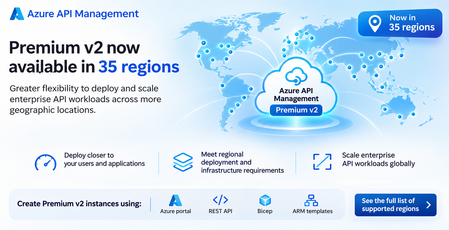
We are excited to announce that Azure API Management Premium v2 is now available in 35 Azure regions, expanding deployment options for organizations building and managing enterprise API workloads on Azure. This expansion marks another milestone in our continued investment in the Azure API Management v2 platform, making it easier for organizations to adopt Premium v2 across more geographic locations while benefiting from its enterprise-grade capabilities, modern infrastructure, and improved scalability. With broader regional availability, customers have greater flexibility to deploy API gateways closer to their applications, backend services, and users, while addressing regional infrastructure requirements and supporting their growing API ecosystems. Expanding the reach of Azure API Management Premium v2 As organizations modernize their applications and adopt cloud-native architectures, APIs have become a critical foundation for connecting applications, services, partners, and increasingly, AI-powered workloads. Enterprise customers often operate across multiple geographic locations, with applications and backend services distributed across Azure regions. Choosing where to deploy API infrastructure is an important architectural decision that can affect application performance, network connectivity, operational consistency, and regional deployment requirements. With Premium v2 now available in 35 Azure regions, organizations have more options to deploy Azure API Management in locations that align with their application architectures and business requirements. This expanded regional footprint provides several benefits: Greater deployment flexibility: Deploy Premium v2 in more Azure regions to align API infrastructure with existing applications, backend services, and enterprise cloud environments. Improved proximity to applications and users: Place API gateways closer to backend services and consumers to help reduce network latency and improve API responsiveness, depending on the network architecture. Support for regional infrastructure requirements: Choose from a broader set of Azure regions to address geographic deployment preferences, data residency considerations, and organizational infrastructure policies. Scalability for growing API workloads: Take advantage of Premium v2 capabilities to support enterprise API traffic as applications and business requirements evolve. Consistent API management across environments: Standardize API security, governance, monitoring, and lifecycle management across deployments using Azure API Management. Built for enterprise API workloads Azure API Management Premium v2 is designed for organizations that require advanced networking, scalability, and enterprise API management capabilities. Built on the v2 infrastructure, Premium v2 provides a modern platform for managing APIs while supporting enterprise scenarios that require private connectivity, network isolation, and integration with backend services hosted in Azure virtual networks. Organizations can use Premium v2 to: Secure API access: Centrally enforce authentication, authorization, rate limiting, and other API policies to protect backend services. Connect to private backend services: Use supported virtual network integration capabilities to securely connect API Management to backend services hosted in private network environments. Support private API architectures: Leverage supported networking capabilities to control API gateway connectivity and align deployments with enterprise network security requirements. Manage API traffic efficiently: Apply policies for request and response transformation, routing, caching, and traffic management. Monitor API operations: Use Azure Monitor and diagnostic capabilities to gain visibility into API traffic, performance, and operational health. The expanded regional availability makes these capabilities accessible to more organizations and workloads across Azure's global infrastructure. Deploy Premium v2 using your preferred tools Customers can create new Azure API Management Premium v2 instances in supported regions using their preferred Azure deployment and automation tools. Azure portal Create and configure Premium v2 instances through the Azure portal using a guided deployment experience. Azure REST API Programmatically provision and manage Premium v2 instances using Azure Resource Manager REST APIs, enabling integration with custom deployment and automation workflows. Bicep Define Premium v2 resources using declarative infrastructure-as-code templates. Bicep helps organizations automate deployments and maintain consistent configurations across environments. Azure Resource Manager (ARM) templates Use ARM templates to deploy Premium v2 instances as part of existing enterprise infrastructure automation and deployment pipelines. These deployment options allow organizations to incorporate Premium v2 into their existing DevOps practices, infrastructure-as-code workflows, and enterprise governance processes. Getting started with Premium v2 If you are planning a new API Management deployment or evaluating Premium v2 for your enterprise API workloads, you can get started by reviewing the supported Azure regions and selecting the location that best aligns with your application architecture. To create a Premium v2 instance: Review the Azure API Management regional availability documentation to confirm that Premium v2 is supported in your preferred region. Choose your deployment method: Azure portal, REST API, Bicep, or ARM templates. Create a new API Management instance and select the Premium v2 pricing tier. Configure networking, security, APIs, and policies based on your application's requirements. Integrate the instance into your existing API management and monitoring workflows. For organizations evaluating a migration from an existing API Management tier, review the supported feature set and networking capabilities to determine whether Premium v2 meets your requirements. What's next? We continue to invest in Azure API Management Premium v2 to support enterprise customers building modern API architectures on Azure. Expanding Premium v2 to 35 Azure regions is an important step toward making the v2 platform available to more customers, providing greater flexibility in where they deploy and manage their API workloads. We encourage customers to explore Premium v2 in their preferred Azure regions and take advantage of its modern infrastructure and enterprise API management capabilities. Learn more: View the full list of Azure API Management supported regions Explore Azure API Management documentationGenerally available: Unified Model API in Azure API Management v2 tiers
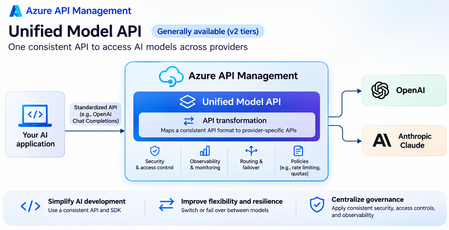
The Unified Model API in Azure API Management is now generally available in v2 tiers, enabling organizations to access and manage AI models from multiple providers through a consistent API interface. This capability simplifies the development of multi-model AI applications by abstracting provider-specific API differences and providing a unified experience for accessing supported large language models (LLMs). As organizations increasingly adopt AI models from multiple providers, developers face challenges integrating different API formats, authentication mechanisms, SDKs, and request and response structures. These differences introduce additional development and maintenance overhead, create dependencies on individual model providers, and make it difficult to switch models or implement multi-model architectures. With the Unified Model API, Azure API Management addresses these challenges by transforming requests and responses between a standardized client-facing API format and provider-specific model APIs. Developers can use a consistent interface, such as the OpenAI Chat Completions API, to interact with supported model providers, including OpenAI and Anthropic, without having to implement and maintain separate integrations for each provider. The Unified Model API also enables organizations to take advantage of Azure API Management's existing gateway capabilities to centrally secure, monitor, and govern AI traffic across model providers. With the Unified Model API, organizations can: Simplify multi-model AI development: Standardize on a single API format and compatible client SDKs to access models from different providers. Reduce provider-specific integration code, accelerate development, and simplify ongoing application maintenance. Improve model portability and flexibility: Switch between supported models and providers without requiring changes to the client-facing API contract. This enables organizations to evaluate and adopt new models based on performance, cost, availability, and evolving business requirements. Build more resilient AI applications: Use Azure API Management's backend management and routing capabilities to distribute requests across supported model backends and implement failover strategies. This helps improve application availability and reduces dependencies on a single model provider. Centralize security and governance: Apply Azure API Management policies to enforce authentication, authorization, rate limiting, and other access controls consistently across supported model providers. Organizations can manage AI model access through a centralized gateway rather than implementing security controls separately for each provider. Improve observability and operational management: Leverage Azure API Management's monitoring, logging, and diagnostics capabilities to gain visibility into AI API traffic, track operational performance, troubleshoot failures, and manage model integrations through a common platform. Accelerate adoption of new AI models: Integrate additional supported model providers behind the same standardized API interface, reducing the effort required to introduce new models into existing applications. By abstracting provider-specific differences behind a unified API and combining model interoperability with enterprise-grade API management capabilities, Azure API Management helps organizations build AI applications that are more portable, resilient, secure, and easier to govern at scale. The Unified Model API is generally available in supported Azure API Management v2 tiers. Get started: Unified Model API documentation
URGENT: Microsoft Edge incorrectly flags paytracc.com as typosquatting after multiple reports
Microsoft Edge Website Typo Protection incorrectly flags https://paytracc.com as a possible misspelling of paytrace.com. Paytracc.com is the legitimate official domain of PayTracc, an independent financial technology product. “PayTracc” is the intentional registered brand spelling and is not impersonating or affiliated with PayTrace. The warning has continued despite repeated reports through the “Report that this site URL is not a misspelling” option. Technical verification: • https://paytracc.com returns HTTP 200 OK. • http://paytracc.com returns HTTP 301 and redirects to HTTPS. • A valid TLS certificate and HSTS are enabled. • Chrome and other browsers do not display this warning. • The issue is reproducible only in Microsoft Edge Website Typo Protection. This false positive is discouraging customers from accessing the website. Anyways to resolve this please? Affected domain: https://paytracc.com Incorrect suggested domain: paytrace.com279Views0likes2CommentsAzure API Management v2: Restoring Predictable Outbound IP Addresses with NAT Gateway
Introduction A key consideration when deploying Azure API Management Standard v2 or Premium v2 is that outbound networking behavior differs from the classic tiers. This applies both when customers manually rebuild an existing solution on one of these tiers and when they create a new deployment based on assumptions formed from classic-tier behavior. In classic tiers, dedicated outbound IP addresses are available and are commonly used by backend services for source-IP allowlisting. With Standard v2 and Premium v2, customers should instead design outbound connectivity explicitly when a predictable public source IP is required. This article applies only to Standard v2 with virtual network integration and Premium v2 with either virtual network integration or virtual network injection. The Challenge Many backend systems still validate the source IP address of incoming traffic. Common examples include: Partner APIs Payment providers Legacy applications On-premises systems Third-party SaaS platforms When designing a new APIM v2 service, or manually rebuilding a solution previously hosted on a classic tier, backend teams often ask: “Which IP address should we allowlist?” Unlike a classic-tier design that relies on the service’s dedicated outbound IP addresses, an APIM v2 service may require an explicit egress pattern. Virtual network integration combined with Azure NAT Gateway can provide a predictable public source IP for outbound traffic that traverses the integrated subnet. Architecture Before: Classic APIM The backend allowlist contains the outbound public IP address associated with the APIM instance. After: APIM v2 Service with NAT Gateway The backend allowlist contains the public IP address assigned to the NAT Gateway. APIM outbound traffic uses the virtual network integration path, and the NAT Gateway provides the predictable public source IP for internet-bound connections from the associated subnet. Configuration Steps Prerequisite - Create an APIM v2 Service The portal walkthrough in this article uses a Standard v2 instance configured for outbound virtual network integration. As shown in the service overview, the dedicated public IP address information available in the classic tiers is not displayed for this APIM v2 instance. Step 1 - Create a Virtual Network Create or select the virtual network that will be used for APIM outbound virtual network integration. Step 2 - Create a Dedicated APIM Subnet Create a subnet dedicated to the APIM v2 instance. The integration subnet must meet the documented requirements for outbound virtual network integration. Reference: Integrate an API Management instance with a virtual network for outbound connectivity Subnet delegation depends on the APIM v2 tier: Standard v2: Delegate the subnet to Microsoft.Web/serverFarms for outbound virtual network integration. Premium v2: Delegate the subnet to Microsoft.ApiManagement/service, whether using virtual network integration or virtual network injection. Step 3 - Associate a Network Security Group Associate a Network Security Group (NSG) with the APIM integration subnet. Configure the required rules according to the documented APIM networking dependencies, while also applying the outbound controls required by your environment. Reference: APIM outbound virtual network integration requirements Step 4 - Configure APIM Virtual Network Integration In the Azure portal, open the API Management instance and navigate to Networking > Virtual network integration. Select the virtual network and dedicated subnet, and then save the configuration. Virtual network integration can also be configured when creating the APIM instance. References: Outbound virtual network integration | API Management v2 service tiers overview Test the Current Outbound IP This example uses a second APIM instance as the backend, although any backend service that records the request source IP can be used. Before NAT Gateway is configured, the backend can observe different Azure source IP addresses. The Azure IP Ranges and Service Tags - Public Cloud file is available from the Microsoft Download Center: Download Azure IP Ranges and Service Tags – Public Cloud from Official Microsoft Download Center Step 5 - Create a NAT Gateway Create an Azure NAT Gateway and associate it with one or more Standard public IP addresses or a public IP prefix. The assigned public IP becomes the predictable source address used for applicable outbound connections through the integrated subnet. For this example, the NAT Gateway uses a Standard public IP address resource. Step 6 - Associate the NAT Gateway with the APIM Subnet Open the NAT Gateway configuration and associate it with the APIM integration subnet. After the association is applied, validate that the effective network configuration matches the intended routing, NSG, and outbound connectivity design. Step 7 - Validate Send a test request through APIM to an endpoint that returns the caller’s public IP address, or inspect the destination backend logs. Confirm that the observed source IP matches the public IP assigned to the NAT Gateway. As expected, the source IP address observed by the backend now matches the NAT Gateway public IP address. When to Use This Pattern This pattern is useful when: Backend teams require source-IP allowlisting. Third-party vendors support only IP-based network controls. Legacy integrations cannot be changed quickly. A manual rebuild of a solution previously hosted on an APIM classic tier must preserve predictable outbound addressing. Recommendations A predictable source IP can simplify firewall integration, but it should not replace strong service-to-service authentication. Where supported, combine or replace IP-based controls with mechanisms such as: Mutual TLS (mTLS) OAuth 2.0 Client certificates Managed identity Private endpoints and Private Link Treat IP allowlisting as an additional network control rather than the primary authentication mechanism. Also validate capacity, resiliency, routing, DNS, NSG rules, and dependency access for the complete solution before production deployment. Conclusion APIM v2 services use a different outbound networking model from the classic tiers. For new deployments or manually rebuilt solutions, outbound virtual network integration combined with Azure NAT Gateway can provide a predictable public source IP for applicable outbound traffic and simplify integration with backend firewall rules.687Views2likes1Comment